Testing REST and gRPC with k6, Part 1: setup and functional tests
In this demo you will see one Docker container, two protocols, and one repo: this two-part series walks through how I tested REST and gRPC with k6 against Grafana’s QuickPizza demo app. Part 1 covers setup and the functional tests; Part 2 covers performance, reporting, the Playwright layer and CI.
Why I built this
Most API test tutorials stop at one REST endpoint and one load script. Real services rarely look like that: the same backend often speaks REST to browsers and gRPC to other services, and both need functional checks and performance numbers.
I wanted one repository that answers three questions against the same running service:
- Does the REST API behave correctly (auth, CRUD, contracts, error cases)?
- Does the gRPC API behave correctly (status, unary calls, invalid input)?
- How do both hold up under load, stress, soak, spike and breakpoint traffic?
The system under test is QuickPizza, Grafana’s demo app, which exposes both a REST API and a gRPC service from a single Docker image. The full project is on GitHub: KulsumSiddique/k6-RestGRPC-Demo.
What’s in the box:
| Layer | Tool | What it tests |
|---|---|---|
| REST functional | k6 | Auth, ratings CRUD, response contracts, health, negative cases |
| gRPC functional | k6 (k6/net/grpc) | Status and RatePizza RPCs, invalid payloads |
| Performance | k6 | Load, stress, soak, spike, breakpoint and synthetic profiles for both protocols |
| Browser | Playwright | Login, ratings UI, API CRUD, accessibility, page timing |
| Reporting | Node script | k6 JSON summary to an HTML dashboard |
Architecture at a glance
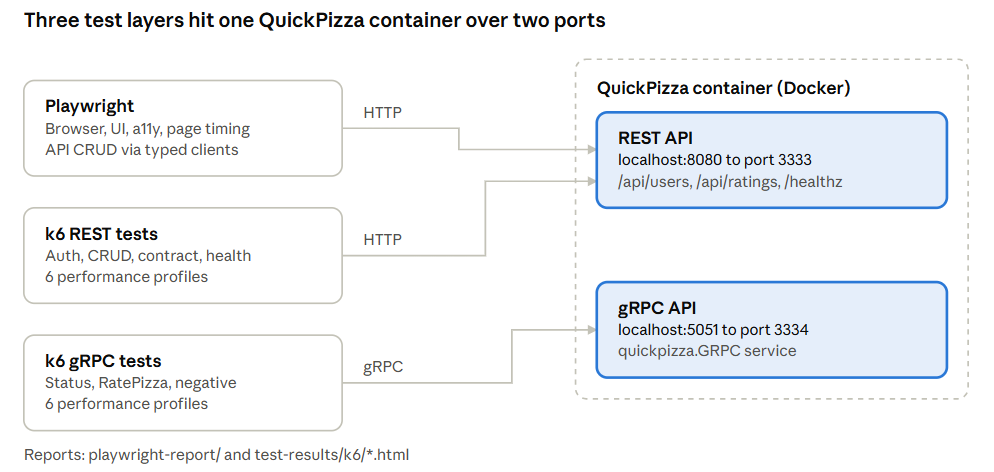
All three layers target the same container, so a REST rating created by k6 and a page rendered by Playwright come from the same backend state.
Steps 1–3: Set up and start QuickPizza
Step 1: Install the prerequisites
You need three tools on your machine:
- Node.js and npm — for Playwright, linting and the report script (CI uses Node 22)
- Docker Desktop — to run QuickPizza locally
- k6 — the load-testing CLI that runs every REST and gRPC test
Step 2: Clone and install
git clone https://github.com/KulsumSiddique/k6-RestGRPC-Demo.git
cd k6-RestGRPC-Demo
npm install
npx playwright install
k6 itself needs no npm packages. Its scripts are plain ES modules that k6 runs with its own engine, so npm install only pulls in Playwright, TypeScript, Zod, ESLint and Prettier.
Step 3: Start QuickPizza in Docker
The whole backend is one service in docker-compose.yml:
services:
  quickpizza:
    image: ghcr.io/grafana/quickpizza-local:0.15.30
    container_name: crud-playwright-quickpizza
    ports:
      - '8080:3333'   # REST
      - '5051:3334'   # gRPC
    environment:
      QUICKPIZZA_ENABLE_ALL_SERVICES: '1'
      QUICKPIZZA_DB: ''
    restart: unless-stopped
Pinning the image tag (0.15.30) keeps runs reproducible. QUICKPIZZA_ENABLE_ALL_SERVICES turns on the gRPC server alongside REST.
Start it and confirm both ports are listening:
docker compose up -d
docker compose ps
lsof -nP -iTCP:8080 -sTCP:LISTEN
lsof -nP -iTCP:5051 -sTCP:LISTEN
If a test later reports connection refused, this step is the first place to look.
Step 4: Shared config and test data
Every k6 script, REST or gRPC, reads its target from one file, shared/config.js. That keeps environment switching out of the tests:
const environment = __ENV.TEST_ENV || 'local';

const defaults = {
  local: {
    restBaseUrl: 'http://localhost:8080',
    grpcAddress: 'localhost:5051',
    grpcTls: false,
  },
  public: {
    restBaseUrl: 'https://quickpizza.grafana.com',
    grpcAddress: 'grpc-quickpizza.grafana.com:443',
    grpcTls: true,
  },
};

const selected = defaults[environment] || defaults.public;

export const config = {
  environment,
  restBaseUrl: __ENV.REST_BASE_URL || selected.restBaseUrl,
  grpcAddress: __ENV.GRPC_ADDR || selected.grpcAddress,
  grpcTls: __ENV.GRPC_TLS ? __ENV.GRPC_TLS !== 'false' : selected.grpcTls,
};
Local is the default. To point the same tests elsewhere, pass environment variables on the command line:
k6 run -e TEST_ENV=public rest/tests/suite.js
k6 run -e REST_BASE_URL=http://my-host:8080 rest/tests/health.js
Test data lives in shared/data.js. Two tiny helpers cover everything: uniqueValue() builds collision-free usernames from a timestamp plus a random number, and randomItem() picks a random pizza payload. Because every iteration creates its own user, tests never share state and can run in parallel without stepping on each other.
Steps 5–6: The REST layer
Step 5: Build thin clients, not fat tests
The REST code is split into four folders, each with one job:
| Folder | Job |
|---|---|
rest/clients/ | One function per endpoint: createUser, login, createRating, getRating, updateRating, deleteRating, getHealth |
rest/data/ | Payload builders: buildRatingPayload(), buildUpdatedRatingPayload() |
rest/schemas/ | Lightweight response validators for users, ratings and errors |
rest/assertions/ | Reusable check() wrappers for status codes, timing and rating bodies |
Everything goes through one wrapper, rest/clients/http-client.js. It adds the JSON header and auth token, tags each request, and records a custom metric:
export const restOperationDuration = new Trend('rest_operation_duration', true);

export function request(method, path, body = null, token = null, tags = {}) {
  const { expectedStatuses, ...metricTags } = tags;
  const headers = { 'Content-Type': 'application/json' };
  if (token) headers.Authorization = `Token ${token}`;

  const params = { headers, tags: { protocol: 'rest', ...metricTags } };
  if (expectedStatuses) params.responseCallback = http.expectedStatuses(...expectedStatuses);
  const payload = body === null ? null : JSON.stringify(body);
  const started = Date.now();
  const response = http.request(method, `${config.restBaseUrl}${path}`, payload, params);
  restOperationDuration.add(Date.now() - started, params.tags);
  return response;
}
Two details matter here:
- Operation tags. Every client passes
{ operation: 'create_rating' }and so on. In the results you can then filter latency per endpoint instead of staring at one blended average. expectedStatuses. k6 counts any 4xx as a failed request by default. When a test expects a 404 (reading a deleted rating), passingexpectedStatuses: [404]keeps that call out ofhttp_req_failed, so the error-rate threshold stays honest.
Step 6: Write the functional tests
The core test is rest/tests/ratings-crud.js. It walks one rating through its whole life with a fresh user:
export default function () {
  const user = buildUser();
  createUser(user);
  const auth = login(user);
  check(auth, { 'auth: token exists': (value) => Boolean(value.token) });

  const created = createRating(buildRatingPayload(), auth.token);
  check(created.response, { 'rating: created': (res) => res.status >= 200 && res.status < 300 });
  assertRating(created.body, 'rating create');

  const id = created.body?.id;
  if (id === undefined || id === null) return;

  assertRating(getRating(id, auth.token).body, 'rating get');

  const updated = updateRating(id, buildUpdatedRatingPayload(), auth.token);
  assertRating(updated.body, 'rating update');

  const removed = deleteRating(id, auth.token);
  check(removed.response, { 'rating: deleted': (res) => res.status >= 200 && res.status < 300 });

  const afterDelete = getRating(id, auth.token, { expectedStatuses: [404] });
  check(afterDelete.response, { 'rating: no longer exists': (res) => res.status === 404 });
}
The last check is the one people skip: a delete that returns 200 but leaves the record readable is still a bug.
The other REST tests follow the same pattern: auth.js (signup and login), contract.js (response shape), health.js (/healthz) and negative.js (unauthorized and invalid requests). rest/tests/suite.js imports all five and runs them in one iteration with strict thresholds:
export const options = {
  vus: 1,
  iterations: 1,
  thresholds: {
    checks: ['rate>0.99'],
    http_req_failed: ['rate<0.01'],
  },
};

export default function () {
  auth();
  contract();
  health();
  negative();
  ratingsCrud();
}
Run a single file or the whole suite:
k6 run rest/tests/ratings-crud.js
k6 run rest/tests/suite.js
If any check fails, the checks threshold fails and k6 exits non-zero, which is exactly what a CI pipeline needs.
Steps 7–8: The gRPC layer
Step 7: Start from the proto contract
gRPC tests begin with the .proto file, not with code. QuickPizza’s contract is small, two unary methods:
syntax = "proto3";

package quickpizza;

service GRPC {
  rpc Status(StatusRequest) returns (StatusResponse);
  rpc RatePizza(PizzaRatingRequest) returns (PizzaRatingResponse);
}

message StatusRequest {}
message StatusResponse { bool ready = 1; }

message PizzaRatingRequest {
  repeated string ingredients = 1;
  string dough = 2;
}
message PizzaRatingResponse { int32 stars_rating = 1; }
k6 loads this file at startup, so no code generation step is needed. The client in grpc/clients/quickpizza-client.js wraps every call and records three custom metrics:
import grpc from 'k6/net/grpc';
import { Trend, Rate, Counter } from 'k6/metrics';
import { config } from '../../shared/config.js';

export const grpcRpcDuration = new Trend('grpc_rpc_duration', true);
export const grpcRpcErrors = new Rate('grpc_rpc_errors');
export const grpcStatusCodes = new Counter('grpc_status_codes');

export const client = new grpc.Client();
client.load(['../../proto'], 'quickpizza.proto');

export function connect() {
  client.connect(config.grpcAddress, { plaintext: !config.grpcTls });
  return client;
}

export function invoke(method, payload, operation) {
  const started = Date.now();
  const response = client.invoke(method, payload, { tags: { protocol: 'grpc', operation } });
  const tags = { protocol: 'grpc', operation, status: String(response.status) };
  grpcRpcDuration.add(Date.now() - started, tags);
  grpcRpcErrors.add(response.status !== grpc.StatusOK, tags);
  grpcStatusCodes.add(1, tags);
  return response;
}

export const status = () => invoke('quickpizza.GRPC/Status', {}, 'status');
export const ratePizza = (payload) => invoke('quickpizza.GRPC/RatePizza', payload, 'rate_pizza');
Why custom metrics? HTTP gives you http_req_failed for free. gRPC errors arrive as status codes inside a successful transport call, so grpc_rpc_errors is what lets you write an error-rate threshold for gRPC at all.
Note the plaintext: !config.grpcTls switch: locally the container speaks plain gRPC on port 5051, while the public QuickPizza endpoint needs TLS on 443. The same test file works for both.
Step 8: Write the gRPC functional tests
The smoke test checks readiness first, then rates a pizza:
export const options = {
  vus: 1,
  iterations: 1,
  thresholds: { checks: ['rate>0.99'], grpc_rpc_errors: ['rate<0.01'] },
};

export default function () {
  connect();
  const health = status();
  assertGrpcOk(health, grpc, 'status');
  assertReady(health);

  const rating = ratePizza(buildPizzaPayload());
  assertGrpcOk(rating, grpc, 'rate pizza');
  assertRating(rating);
  close();
}
The rest of the gRPC suite:
status.jsandrate-pizza.jscover each RPC on its own.negative.jssends{ ingredients: [], dough: '' }and checks the server answers withInvalidArgumentorOKrather than crashing.streaming.jsrecords that the contract exposes no streaming RPCs, so the gap is visible in every report instead of silently missing.
grpc/tests/suite.js runs them all in one go:
k6 run grpc/tests/smoke.js
k6 run grpc/tests/suite.js
Coming up in Part 2
You now have a working functional suite for both protocols. Part 2 (Part 2: Performance, reporting and CI) reuses the same clients to run six performance profiles (load, stress, soak, spike, breakpoint and synthetic), turns the k6 output into an HTML report, and adds the Playwright layer and CI.
Resources
These are the official docs behind each step in this part, in reading order.
| Resource | Why read it |
|---|---|
| Install k6 | Install commands for macOS, Linux, Windows and Docker |
| QuickPizza | The demo app under test, with its REST and gRPC services |
| Introduction to gRPC | How services, methods and stubs fit together, if gRPC is new to you |
| Protocol Buffers proto3 guide | The syntax behind quickpizza.proto: messages, field numbers, repeated, services |
| gRPC status codes | What OK, INVALID_ARGUMENT and the other codes mean, for writing negative tests |
| k6 gRPC guide | Loading .proto files or using reflection, unary and streaming calls in k6 |
| k6/net/grpc API | Reference for Client.load(), connect(), invoke() and the response object |
| k6 checks | Why a failed check does not fail the run until you pair it with a threshold |
| Tags and groups | Adding operation and protocol tags to requests and filtering results by them |
| Create custom metrics | Trend, Rate and Counter, as used for grpc_rpc_errors and rest_operation_duration |
| k6-RestGRPC-Demo | The full source code for both parts of this series |